Upgrading your bad Shell to amazing Shell
In most reverse shell call backs that you get from your victim computers, they are not a very convenient and stable connections, and do not have the advantages and functionalities that you would get from a ssh shell connection, like the auto-fill, tab, etc.
This Blog post is going to be showing you the steps to upgrade your "Bad Shell" into a "Good Shell", which you can mostly use in any Linux shell which has python3 installed in it.
Upgrading the Shell
The examples shows in this blog is part of one of the CTF challenge
- Once you have got a shell on your victim computer, check to see if you have python install (mostly all
Linuxmachines will have Python installed in them). If python is installed, then run the following command:
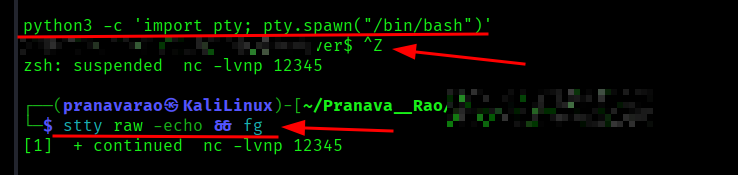
python3 -c 'import pty; pty.spawn("/bin/bash")'
-
Once you have executed this command you will get a bash shell to interact with. Then press
Ctrl + Z(To suspend the current netcat/ reverse shell session). -
On the same terminal (you would have your normal terminal now), enter the following command:
stty raw -echo && fg
There you go, a better shell to interact!!!
How does that work
The following explanations from here are written by an AI (ChatGPT), hence let me know if there are any issues with it.
When you first catch a reverse shell (for example, through nc), what you typically get is a very minimal, non-interactive shell. It’s not a “real” terminal — it’s just a raw stream of input and output over a socket.
That’s why things feel broken:
- No tab completion
- No command history
- Arrow keys don’t work
- Programs like
vim,top, ornanobehave strangely or fail - Signals like
Ctrl + Cmay kill the whole connection
To understand the upgrade process, you need to know about pseudo-terminals (PTYs).
Step 1: Spawning a PTY with Python
python3 -c 'import pty; pty.spawn("/bin/bash")'
This works because Python’s built-in pty module creates a pseudo-terminal device, which mimics a real terminal.
What this actually does:
- Allocates a PTY on the target machine
- Launches
/bin/bashattached to that PTY - Bridges your raw socket to this new terminal
Why it matters:
Programs like bash behave differently depending on whether they are connected to:
- a real terminal (TTY/PTY) → full interactive features
- a pipe/socket → limited, “dumb” mode
Before this step, your shell is just a pipe. After this step, it becomes something much closer to a real terminal session.
Step 2: Suspending the Shell (Ctrl + Z)
When you press:
Ctrl + Z
you are sending a SIGTSTP (terminal stop signal) to the current foreground process.
What happens:
- Your reverse shell process is suspended locally
- You return to your own terminal prompt
This is important because now you can reconfigure your local terminal to properly handle the upgraded shell.
Step 3: Fixing Terminal Behaviour with stty
stty raw -echo && fg
This is the step that makes everything feel normal again.
Breaking it down:
stty raw
- Switches your local terminal into raw mode
- Input is sent character-by-character, not line-by-line
- Disables special processing (like Ctrl+C being handled locally)
-echo
- Prevents your terminal from echoing typed characters
- Without this, you’d see duplicated input
fg
- Brings the suspended reverse shell back to the foreground
Why This Fixes the Shell
At this point, you’ve aligned three critical pieces:
- Remote side → Now running inside a PTY (via Python)
- Local side → Configured to pass input/output transparently (
stty raw -echo) - Connection → Still the same socket, but now behaving like a real terminal
This combination allows:
- Proper signal handling (
Ctrl+C,Ctrl+Z) - Interactive programs to work correctly
- Line editing and job control
- A much more stable and usable shell
The Big Picture
A basic reverse shell is just:
stdin/stdout over a network socket
A fully interactive shell requires:
a terminal interface (TTY/PTY) + proper input/output handling
This technique works by:
- Adding a PTY on the remote system
- Configuring your local terminal to match it
Bonus: Why Python?
Python is commonly used here because:
- It’s installed on most Linux systems by default
- It provides easy access to PTY functionality (
pty.spawn) - The one-liner is short and reliable
Other methods (using script, perl, or socat) achieve the same goal, but Python is often the quickest option.
Bonus Info: What is PTY
A PTY (pseudo-terminal) is basically a software-emulated terminal that behaves like a real one.
The idea behind a terminal
Originally, a terminal was a physical device (keyboard + screen) connected to a computer. Programs like bash were designed to talk to that kind of device:
- They expect interactive input (keystrokes)
- They handle signals like
Ctrl+C - They control cursor movement, screen updates, etc.
Modern systems (like Linux) still follow this model — even though the “terminal” is now usually just a window.
What a PTY actually is
A PTY (pseudo-terminal) is a pair of virtual devices created by the OS:
- Master side → controlled by a program (like your reverse shell or SSH client)
- Slave side → looks like a real terminal to programs like
bash
Think of it like a translator layer:
- One side talks “program”
- The other side talks “terminal”
Why PTYs matter
Programs behave differently depending on whether they are connected to a terminal or not.
Without a PTY (your initial reverse shell):
- Bash thinks it's talking to a pipe/socket
- No interactive features
- No proper signal handling
- Tools like
vimbreak
With a PTY:
- Bash thinks it's talking to a real terminal
- Enables:
- Command history
- Tab completion
- Job control (
Ctrl+Z,fg) - Interactive apps (
top,nano, etc.)
Simple analogy
- Without PTY → like talking over a walkie-talkie (basic input/output)
- With PTY → like a full phone call with proper interaction
How it fits your reverse shell trick
When you run:
python3 -c 'import pty; pty.spawn("/bin/bash")'
Python:
- Creates a PTY
- Launches
/bin/bashattached to it - Connects that PTY to your network shell
So now:
- Bash is happy (it sees a terminal)
- You get a much more “real” shell experience
One-line definition
A PTY (pseudo-terminal) is a virtual terminal interface that allows programs to behave as if they are connected to a real interactive terminal, even when communicating over a network or through another program.